Showing posts with label Android. Show all posts

Five best features of Android 4.1 Jelly Bean


Google

Google announced Jelly Bean, also known as Android 4.1, on Wednesday. The shiny new operating system brings new features such as a speedier interface, a new Camera app, offline voice typing, significantly improved notifications, a Siri-like voice search, Google Now and more. Here are the features we've enjoyed using the most so far.
Android

Project Butter
There's been a lot of talk about something called "Project Butter" during the Google I/O developers conference and unsurprisingly the whole thing doesn't have anything to do with dairy products. Instead it's what Google has labeled the under-the-hood improvements which keep Jelly Bean running — I couldn't resist this line, I'm sorry — like butter.

Buffering tweaks, increased frame rates, a system which keeps rendering and touch input events in sync better, and touch prediction come together to make everything run just a little bit more nicely. (Yes, Jelly Bean actually tries to predict where you'll touch the screen next.)
It's tough to tell how much of a difference Project Butter will truly make, but based on a bit of time with a Nexus 7 tablet running Jelly Bean, it seems as if Jelly Bean runs more smoothly than prior Android versions. amd it's important for Google to take steps to make the Android experience as smooth as possible.
Android

Offline voice typing
How annoying is it when you can't dictate something to your phone because you don't have a cellular or Wi-Fi data connection? Jelly Bean makes this pesky issue a thing of the past with offline voice typing.

When your device has a poor data connection or no connection at all, voice-to-text tasks are crunched locally instead of in the cloud. 
So how good is it? Good enough and speedy enough. The reason that companies like Google and Apple put voice recognition in the cloud in the first place is that it makes it easier to run your voice against thousands of samples in the blink of an eye. So it's no surprise that the offline voice-to-text is slightly less accurate than the cloud-based version, which has been my experience.
Google Now
I have a hunch that we'll be talking about Google Now a lot in the future. It's Google's attempt to predict what you'll need and get it to you before you even realize you need it. In theory, your device should learn your habits, interests and so on, and then offer up relevant traffic, weather and point-of-interest information.

I don't know whether it's the lousy Wi-Fi and cellular connection I get in this part of San Francisco or whether Google Now just has to get to know me better before taking charge of my life, but for whatever reason I am not being offered much information. We'll circle back and chat about this feature after I've used it more, but I'm willing to label it as one of Jelly Bean's best attributes based on its potential alone.
Android

Voice search
S-Voice, the Siri competitor included on the Samsung Galaxy S III, was a total letdown in my opinion, but Google's handling things much better.

Google's voice search is now powered by Knowledge Graph, meaning that you'll receive what Google deems to be the best answer to your query first, followed by relevant web results. In some quick tests, Google's voice search definitely made Siri look terrible, as the iOS-based assistant has a bad habit of simply offering to search teh web for you in situations where Google already has an answer.
Android

Notifications
I may be an iOS fangirl who is so attached to her iPhone that she sleeps with it right next to her head, but even I have to admit that Google's definitely doing something right with notifications.

In Jelly Bean, the notification bar can do more than ever. It can now expand, to show you a portion of your inbox, rather than just the number of emails waiting for you. (Yes, this is similar to one of the display options for email notifications in iOS, but those can't be compacted with a touch.)
Google Now cards also appear in the notifications tray, meaning that you can view relevant information just by opening the notifications rather than having to switch apps.
The changes to notifications are small touches, but based on some time with a Galaxy Nexus running Jelly Bean, it's easy to see that the time and frustrations they'll save you will quickly add up.

This news is collected from msn news....

Samsung Galaxy Ace 2 Smartphone set for MWC 2012


samsung galaxy ace2Mobile World Congress 2012 is just some steps ahead and by now we have seen many of the amazing devices waiting to get introduced. Along with those awaited devices there are a couple of Galaxy Series handsets waiting too which have their name as Samsung Galaxy Ace 2 and Galaxy Mini 2 which are getting impatient to quickly get into Mobile World Congress (MWC 2012) next week. These two are recently confirmed by Samsung and are the improving version of the Galaxy Ace and Galaxy Mini that too with an upgraded processor, display, as well as camera. The furthermore

Samsung Officially unveiled Galaxy Mini 2 S6500 in Germany


samsung galaxy mini 2 s6500Samsung has released a new Smartphone in Germany which has been debuted as Samsung Galaxy Mini 2 S6500. You must have seen this handset as it came to view a few weeks back at the time MWC 2012 took place. This Smartphone was brought up along with the Galaxy Ace 2. Now it has finally reached and the Galaxy Mini 2 can be pre ordered from the UK having a price tag £179.95 (about €216) SIM-free. As per the press release, the Galaxy Mini 2 S6500 Smartphone is on the way to reach Germany with a price tag of €279 which is higher than that of the price for the UK market. In fact, the S6500 Galaxy Mini 2 is the successor to the Samsung Galaxy Mini S5570 introduced in early 2011. The furthermore details related to the configurations of the device have been discussed below.

Android 5.0 Jelly Bean name confirmed by Asus


Speaking at MWC 2012, handset manufacturer Asus has seemingly confirmed the name of Google's next Android OS with 5.0 to be dubbed Jelly Bean

Unofficial VLC for Android and iOS ready to download now


Itching to try out VLC Media Player for Android? It’s now available for download although it’s still in beta so expect a little bump here and there, but the good thing is that it’s now available.
The beta version will run on the following chipsets: ARMv6/ARM11, ARMv7a/Cortex-A8/NEON and ARMv7a/Cortex-A9, so better check out what your phone’s chipset is before installing it.

Android ICS Lightspeed ROM for Acer Iconia A500 – Installation Instructions

Acer Iconia Tab A500
Acer Iconia A200 and A100 users might be already enjoying the Android ICS Firmware on their devices already due to the latest official updates. But still the Update for A500 has to come, although one is leaked but it did cause problems with many people and the device didn’t even boot. The Initial stage of the ROMs is always weird but then the developer named “smaury” started working on the ROM, and finally his work paid off and he successfully created the Lightspeed ROM for Acer Iconia Tab A500, the best things about his created ROM is that all Acer-Loaded applications have been removed, the ROM is bloatware free and amazingly fast.

360 Launcher for Android: Enjoy MIUI fun on your Android for Free

360 Launcher homescreen360 Launcher is a nice new launcher which imitates the MIUI ROM. This launcher was first developed in Chinese and later got translated into English with the help of a XDA member.
I personally tested this launcher and i must say it is a must have launcher for any Androidian. It is fast and full of eye candy themes and wallpapers which are downloadable completely for free from the Official site . I really liked the Weather Widget but we can’t change its location setting from Beijing. Although it looks kinda nice just sitting there on my homescreen.


You also get a Power widget bundled with the launcher. The Flashlight included in the widget works out of the box i.e. you don’t need an app to run it.

Google’s $12.5 bn Takeover of Motorola Mobility Approved by US and EU Regulators


Both the European Union and US Department of Justice have accepted Google’s proposal to buy Motorola Mobility for $12.5 billion.
Google’s buyout of Motorola Mobility has resolved two major obstacles. After European Union approved the deal, US Department of Justice (DoJ) declared late Monday afternoon that Google’s bid to purchase Motorola for $12.5 billion does not infringe antitrust laws and will be permitted to continue.

Nokia’s Android Phone – A First Look!


Nokia Android Phone Nokia is one of the world”s most prestigious and most reputed companies when it comes to mobile handsets. They have years of technical expertise and knowledge that have helped them conquer great heights. The manufacturer is well known for its reliability and service backup.
Nokia has in the recent past been flooding the mobile scenario with surprises. First it was the turn of the N9 which was Nokia”s first Meego Venture. It was a Superphone from Nokia that ran using the Linux based Meego OS. Nokia launched the mobile with Meego OS even though the Meego OS was fast losing its appeal.

Nokia Android prototype leaks - see what could have been


Lots of people, us included, are still wondering what could have been if Nokia had gone for Android rather than WP7 as their main platform. Well thanks to a leaked prototype today we have the chance to get a glimpse of that alternative universe, where Nokia likes its smartphones full of green droids.
The prototype resembles the recently announced N9 and the Nokia WP7 prototype that we saw yesterday. It is running on a stock version of Android 2.3 Gingerbread, but judging by the size of those icons its resolution might be higher than WVGA.

АA Nokia prototype running on Android
Now there's always the chance that the images could be fake. Yet they come from the same source that brought us Nokia's first WP7 device back in May, which turned out real yesterday we feel we can trust him on this one too. In the end, we will never know what it could have been, so this leak could be as much a closure as we are going to get.

Minimum System Requirements For Ice Cream Sandwich -ICS 4.x


Google has officially taken the wraps off from the Google Android 4.0 Ice Cream Sandwich many days before. Also shipped Samsung Galaxy Nexus which is preloaded with ICS operating system.
The software developer kit , the source code of ICS is also available for developers. Which has made developers to engage themselves in porting ICS for all devices.
Every android user wants his phone to be powered with ICS. Not just because it is efficient than the older versions , but also to bring a change in the look and feel of their phone.
Recently Google promissed ICS “to run on all devices”. Thus does not mean it will runn on any phone with any specs. It just mean that ICS is designed to operate with tablet or smartphone, whatever the screen size is.
If so, What are the minimum hardware requirements for ICS?
image
Head Moderator of CyanogenMod forum said that there are two basic requirements to run Ice Cream Sandwich
I.e. Devices must have 256 MB RAM or more and also decent GPU since Hardware-accelerated 2D drawing might be needed.
Although these requirements are mandatory they are not just enough if you want ICS to run smoothly and if you want latest ICS updates to fit your device.
According to some experts 1GHz Dual core processors with 512+ Mb RAM are essential. If your phone has less specs than this, dont worry.. You can get custom roms from developers like Cyanogen.
Even if your phone meets these requirements you might not get official ICS firmware update for your phone. Because there are lot of gateways within it reach you as an official firmware update as your manufacturer needs to finish official agreements with Google before launching ICS update.
If your phone doesnt get official update , you might get custom ROMs for ICS from developers.Check online for one which suits your Model. You can also try ICS Launchers or ICS themes before you get ROMs.

A Beginner's Guide To Rooting Android Phone


What is Rooting?

rooting android
If you  have an android phone you will come across the word “Rooting” on many blogs, forums and almost all sites with gadgets info. But for those who are new to android, this word might seems strange. So here in this post I would like to explain about the meaning, advantages, disadvantages, procedure for rooting a device powered by android.
Rooting is a process of gaining super user access of the operating system by which you can avail many features which are locked on non rooted phones. You can find some in the advantages section below. In other words Rooting allows you run as “superuser”, effectively giving you total control over the OS.
What are the advantages of rooting?
rooting android
The main reason for people to root their phones is that it gives  freedom to access your os completely and to alter/utilize system resources as you wish. Here are some of the tweeks and uses of rooting.
Gain control over system files:
You might have seen that there are no options on a non rooted android phone to access/alter/
uninstall preinstalled apps on android. But by rooting you can do anything you wish. YES, Practically, Anything and Everything  you wish on your rooted phone.
Improve performance:
By using some apps for rooted phones, you can play some tweaks on your phone which can increase performance of your android. One them is overclocking processor(There are many apps available for this, but I am not sure about how good this action is, for your device).
Customization:
As I already said, Rooting gives you to gain complete control over system files. Which facilitates you to work with your system files to customize your phone as you wish. It may be theme customization or something else. By customizing I have installed  Galaxy S2′s TouchWiz 4 on my Galaxy S.
Latest updates:
There might be very less frequent updates being launched for your Phone model from your Manufacturer. But if you have a rooted phone, you can change different roms designed by third party developers and can be updated by your manufacturer’s future updates.
More apps:
You can avail many apps on internet and
 android market just for phones with super user access(rooted phone).
Add Free Apps:
If you have the habit of using trail version apps then you might have seen ads on those apps which really annoys very much while using the app, especially in games. But by using a simple app by name “AddFree”, you can get rid of all ads which annoys you on android.
Backup & Restore:
By rooting your phone, you can take a complete backup of the settings and files of your android and can restore when ever if your os fails to perform some action.
What are the disadvantages of rooting?
rooting android device
Rooting a phone may looks interesting, But be known about the risks behind rooting your phone. There are many disadvantages in rooting android. Some of then are listed below.
Warranty void:
By rooting your phone , You are going to loose the manufacturer’s warranty for the phone. Although you can gain this warranty back by unrooting your phone back to normal. It is still a risk to move on with if and only if you
 dont know what you are doing with your rooted phone.
Risks:
As I said before, you must be well known about the actions you perform on your rooted phone otherwise it might brick your phone. For example if you delete a file related to camera software of your phone from systen files on a rooted phone . It makes the camera function unavailable by using that app.
How to root android phones?
root-android
-There are two ways to root your android phone, first one is by using softwares like SuperOneClick, Z4Root and Universal AndRoot. By which you can root and unroot your phone on a single click from your computer after connecting your phone to system by using usb as mentioned those softwares user guides.
-The second one is by searching for an rooting image file which you need to download on your phone PDA section which gets you the super user access.

‘Transparent Screen’ Android App Lets You Text And Walk Without Fear


transparentscreen

I used to scowl when I saw peoplewalking  down the street with eyes locked on their phones, but necessity has gotten me in the habit of doing it too. Thanks to a new app called Transparent Screen though, now I can do it free from the fear of falling into an open manhole or into a large fountain.
No, that’s not a hastily Photos hopped image you see here, that’s more or less exactly what you’ll see when the app is running. I say “more or less” because while all of the Android UI goes translucent upon launch, you’re afforded with quite a bit of a control over how dramatic the effect is. It’s in your best interest to get familiar with the settings if you plan on using  Transparent Screen for a while too, because you’ll soon have some choices to make.
If you’re a fan of texting while sprinting for example (which I don’t condone, for the record), crank the camera resolution down to keep that forward view going as smoothly possible. Alternately, crank it up you’re more a fan of slow, meandering walks while you tweet about the wonders of nature.
The big issue, as Android Police points out, is that you’d be hard-pressed to find a configuration that works well while bouncing between your favorite apps. Still, that’s a pretty minor concern —Transparent Screen seems like an app best used occasionally, when you absolutely have to fire off a message while on the move. Sure, there’s nothing that says you can’t have it running nonstop, just be prepared to watch your remaining battery life disappear in front of your eyes.
Interested? Mosey on over to the Android Market, where Transparent Screen can be had for the low, low price of free.

Get ready for the beautiful mobile charger yet The Andru

andru
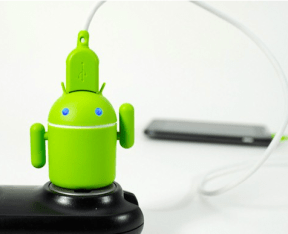
I think there’s no such word that could be pronounced, searched more than the word Android now a days. Google has put a blessing on the mobile world by giving this OS. After that techies and software engineers take it ahead by giving customization to the android by giving more apps, Games,  widgets and every thing that is needed to make your mobile experience more beautiful. Now its the time to customize the hardware and none are quite as charming as Andru here. The new charger for all Android mobile.
Aside from being able to charge your gadgets with aplomb (at which point his beady eyes
light up), relentless fidgeters like me can also spin his little arms around. And when Andru isn’t in use, feel free to give him a pair of legs by slipping on that bright green prong cover.
Really, what better way to pledge your allegiance to Google than by making sure the power that runs into your Android device first runs though a small green robot?
Alright, so Andru isn’t exactly the first Android-themed charger we’ve seen, but it certainly seems to be a nicer option than some of the alternatives. Those of you who feel the compulsive urge to fill your home or workspace with geeky tchotchkes can pick up an Andru from Gen for $25, which is still probably less than a bog-standard microUSB charger at your local big box store.

Samsung Galaxy S III rumour round-up – Screen, camera, release date, price and more


Samsung Galaxy S III rumour round-up – Screen, camera, release date, price and more

Much like people interested in iOS keep looking forward to the next iteration of the Apple iPhone, those interested in Android now await the next version of Samsung’s flagship handset. The Samsung Galaxy S and the Samsung Galaxy S II were resounding hits, so it’s only natural that the Samsung Galaxy S III draws a lot of interest – much more so than the Samsung-Google Galaxy Nexus.

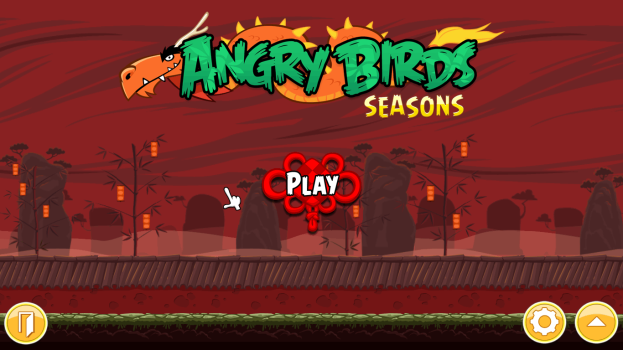
Angry Birds Seasons 2.2 - The Year of Dragon PC Game

Angry Birds the game that created the History for iOS most downloaded game some time ago has already released many of its variant which can downloaded both for iOS and PC so earlier we have posted many versions of Angry Birds like Angry Birds Seasons 2 and many more stuff so today we are bringing you the latest version of Angry Birds that’s The Year of Dragon 

Angry Birds The Year of Dragon

Related Posts Plugin for WordPress, Blogger...
Powered by Blogger.
Widget by:Tech22
Subscribe to RSS Feed Follow me on Twitter!